AI Receptionist for Dental Practices: What It Actually Automates When the Front Desk Can't Answer
Dental front desks miss roughly a third of inbound calls during normal hours. Here is what an AI receptionist actually automates, what it doesn't, and how to size the opportunity for one practice.
By AgentLane Founder · Founder
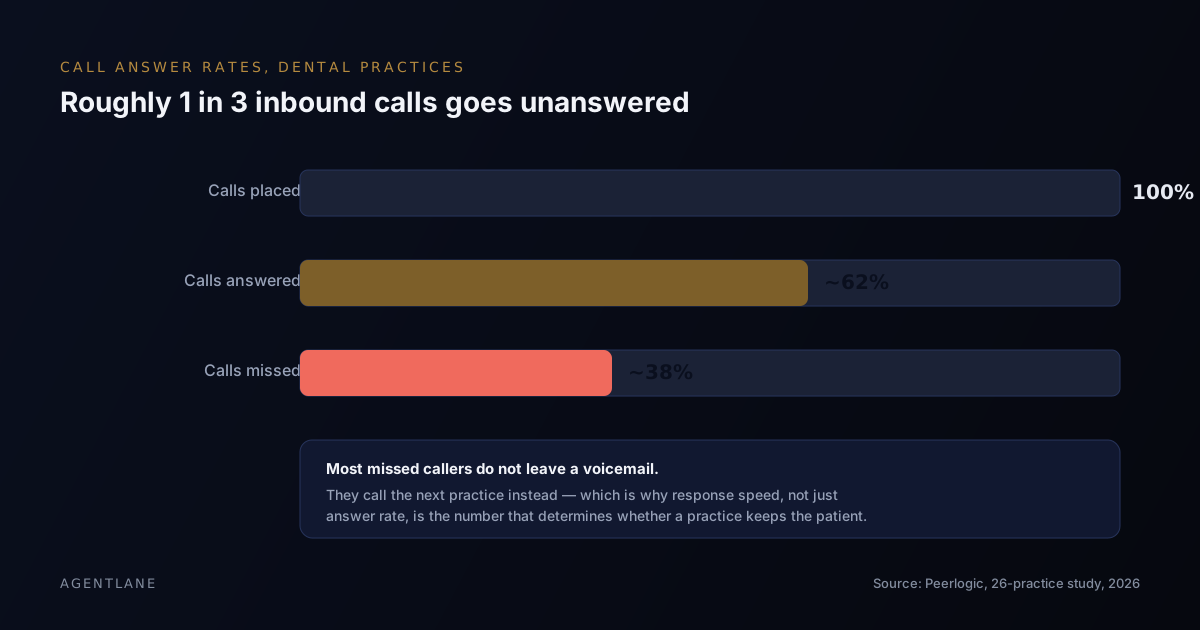
An AI receptionist for a dental practice instantly texts back the calls the front desk cannot take — mid check-in, on another line, at lunch, after hours — qualifies what the caller needs over that text conversation, and books routine appointments straight into the practice's calendar. It does not replace clinical staff, and it should never handle an emergency alone.
Dental front desks run three jobs at once: checking patients in, verifying insurance, and answering the phone. The phone usually loses. That is not a staffing failure so much as a scheduling one — there is rarely a fourth person whose only job is the phone.
This article covers how many calls that actually costs a typical practice, what an AI receptionist automates step by step, what it deliberately does not touch, and how to size the opportunity before you build anything.
How many calls does a dental practice miss?
More than most owners assume, and the gap is well documented rather than anecdotal.
A 2026 case study by Peerlogic tracked 4,280 inbound calls across a 26-practice dental group and found that 38% went unanswered during normal business hours (see the chart at the top of this article). Of the calls that were answered, only 25% of new-patient enquiries converted into a booked appointment — the single largest reason being calls that disconnected before reaching a staff member.
Separately, Scheduling Institute — a dental-practice management consultancy — has argued for years that the average practice loses roughly one in three new-patient calls without realising it, because nobody is counting.
Both of those numbers land in the same range for a reason: nobody built the front desk to be a fourth full-time job. Checking a patient in, taking payment, verifying a plan and picking up a ringing phone are four things happening at once, and the phone is the one job with no visible cost when it is dropped — until the patient calls someone else.
Why speed matters more than the callback
The instinct is the same one every business has: "we call people back." That closes the loop eventually, but a missed call is rarely a callback opportunity for long. Most callers who reach voicemail or a dead ring do not leave a message — they dial the next practice instead, and by the time anyone calls back, the slot they wanted at that practice is filled by someone else's.
This is not dental-specific. It is the same dynamic behind lead-response research across industries: the value of a reply decays fastest in the first few minutes, and a same-day callback is a very different thing from an instant one from the caller's point of view. What is dental-specific is the stakes: a new patient is worth a single visit plus, for the ones who stay, years of recurring hygiene and treatment revenue — which is exactly why the practices that answer fastest tend to convert the best.
What it automates — worked as a decision tree
The trigger is the same regardless of what the caller needs: an unanswered or busy call on the practice line fires a webhook, handled by porting the number to a programmable telephony provider or by conditional forwarding, so the number on the practice's signage and website never changes. Within seconds the caller gets a text acknowledging the missed call and asking one specific question — new patient or existing, and what they need. What happens next branches on the answer:
If the reply describes pain, trauma, swelling, or anything with a safety dimension → it pages a team member immediately, full stop. This branch is not optional and should never be softened by a confidence threshold — "probably fine" is not a judgment the automation is qualified to make. The automated thread only confirms that help is on the way; it does not attempt to triage the emergency itself.
If the reply is a new-patient enquiry → the agent shares whatever pricing and insurance information the practice has pre-approved for it to quote, then offers real open slots from the practice's live calendar.
If the reply is an existing patient asking to reschedule or book a routine cleaning → it skips the pricing step entirely and goes straight to available slots, since the practice already has their record.
If the reply doesn't match any of the above — a billing question, a complaint, something ambiguous — → it should default to a human rather than force-fitting the enquiry into the nearest category. A dental-specific flow that guesses wrong here is worse than one that admits it needs a person.
For the two booking branches, the agent confirms a slot and writes it directly into the scheduling system the front desk already uses — nobody re-enters anything by hand. This is the same branching agentic pattern AgentLane's own Lead Qualifier runs for any consultation-booking business, just with the specific decision points a dental front desk actually needs:
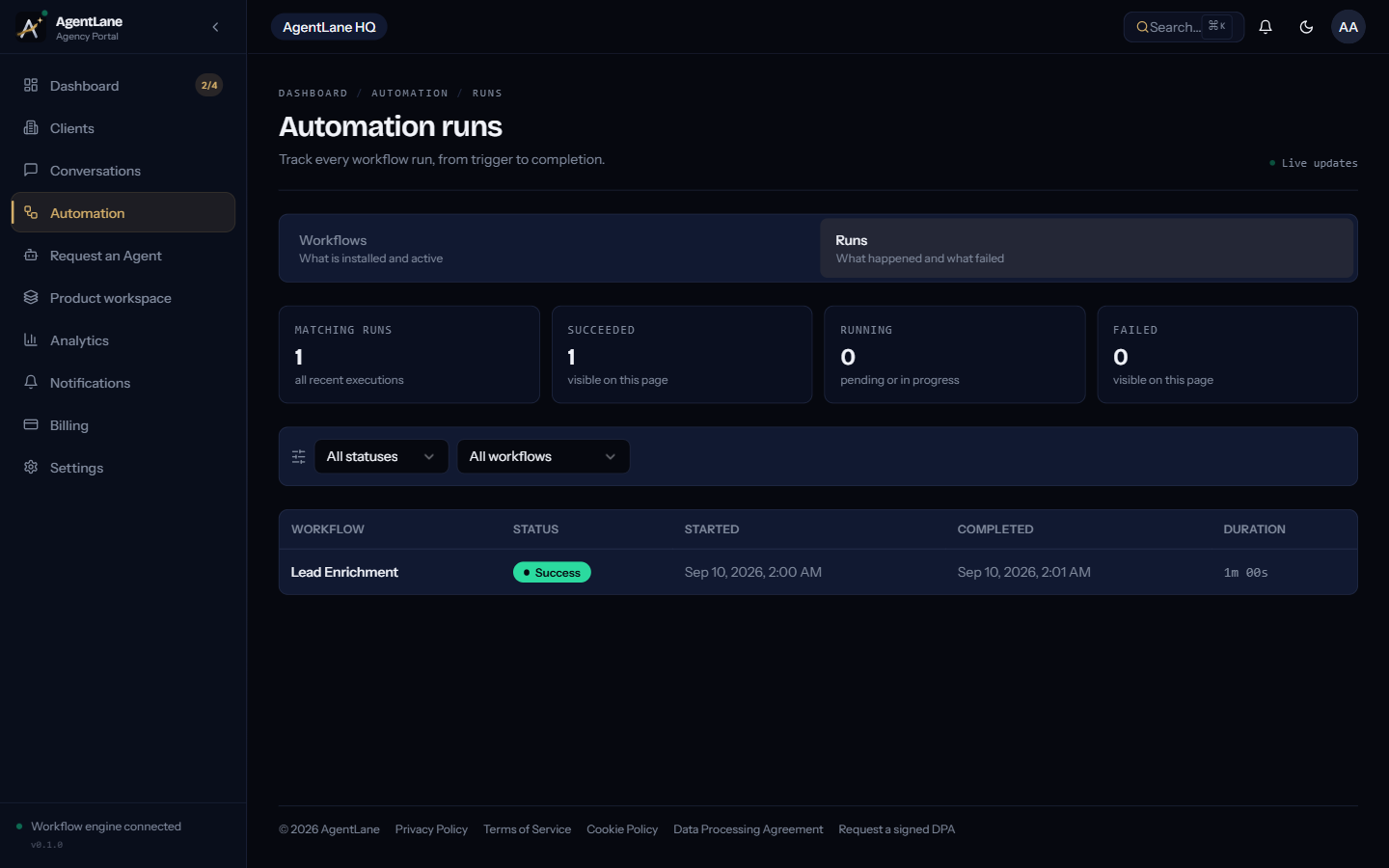
Every branch above should be visible in a feed like this one — if a run silently fails rather than landing in an urgency, booking, or human-escalation branch, that is the first place to look.
What it deliberately does not do
It does not replace clinical judgement. Treatment planning, diagnosis and anything requiring a dentist's assessment stay exactly where they are.
It does not verify insurance in real time. It can share whatever plans and typical costs the practice has pre-approved for it to quote. Confirming an individual patient's actual coverage is a front-desk task.
It does not handle emergencies alone. A caller describing significant pain, trauma or swelling should be escalated to a human within the same exchange, every time, with no exception carved out for "probably fine."
It does not pretend to be a person if asked. The flow should say plainly that it is automated if a caller asks. Trying to disguise that is a trust problem waiting to surface, and it usually surfaces in a review.
Sizing the opportunity for one practice
Before building anything, count your own numbers for a week rather than trusting an industry average either way:
| Input | Where to get it |
|---|---|
| Calls per week | Phone system report or call log |
| % missed or abandoned before pickup | Same log, counted honestly |
| Average new-patient value (first visit) | Recent invoices for new patients, averaged |
| % of answered new-patient calls that book | Bookings ÷ new-patient calls taken |
The arithmetic is the same shape as any missed-call problem: calls × miss rate × average value × close rate = the weekly opportunity sitting in the gap. What you will not know until you count is whether that gap is large enough at your call volume to justify building anything — for a single-dentist practice taking twenty calls a week, it may not be yet. For a multi-chair practice or a small DSO, it usually is. The general version of this same calculation, worked with a home-services example, is in our missed-call text-back piece.
Where to start
Pull your practice's own call log for one week before deciding anything. That single number — not an industry average, not a vendor's projection — determines whether this is worth building for your practice specifically.
If the numbers make the case, see how a Lead Qualifier agent actually gets deployed — Lead Qualifier is the worked example throughout that page — or book a free consultation and bring the log with you. If they don't, that is a useful answer too.
I put this together after a run of near-identical conversations with agency partners onboarding dental clients — the branching logic above is what we actually ship, not a simplified version of it. Figures cited are linked to their original sources.
Sources:
Frequently asked questions
- Does an AI receptionist replace the front desk team?
- No. It closes the gap around them — calls that arrive while the team is mid check-in, on another line, or after hours. Clinical judgement, treatment planning and in-person care stay with the practice.
- What happens if a caller has a dental emergency?
- It should never be handled end to end by automation. A well-built flow classifies urgency from the first reply and pages a human immediately for anything with pain, trauma or a safety dimension — the automation only confirms that help is on the way.
- Can it check insurance or quote a price?
- It can share whatever pricing and insurance information the practice has approved in advance — accepted plans, typical costs for common procedures. It should not attempt to verify individual insurance benefits in real time; that gets handed to the team.
- How is patient data handled?
- Conversation data should be stored in a defined region, retained for a stated period and then purged automatically, with the practice able to request deletion at any time. If your practice has specific regulatory requirements beyond general data protection law — HIPAA in the US is the common example — raise it before you build anything, since that changes the infrastructure, not just the wording.
- How long does it take to get one live?
- A configured agent for a single practice, using an existing price list, hours and calendar link, is typically live within 24 hours. Most of that time is testing against real call patterns and getting the escalation rules right, not the AI itself.
- Is this the same as a human answering service?
- No. An answering service routes the call to a person, usually off-site, who follows a script. An AI receptionist replies by text within seconds of the missed call, qualifies the enquiry itself, and can book straight into the practice's calendar without a human in the loop for routine cases. Voice answering is in limited internal testing and is not generally available. The two are not mutually exclusive — some practices run both.