Building an Appointment Reminder Flow on Cal.com: A Build Log
A walk-through of setting up an appointment reminder flow on top of Cal.com the way AgentLane agents actually consume it — the credential waterfall, the booking check, and where the reminder logic still needs a person.
By AgentLane Founder · Founder
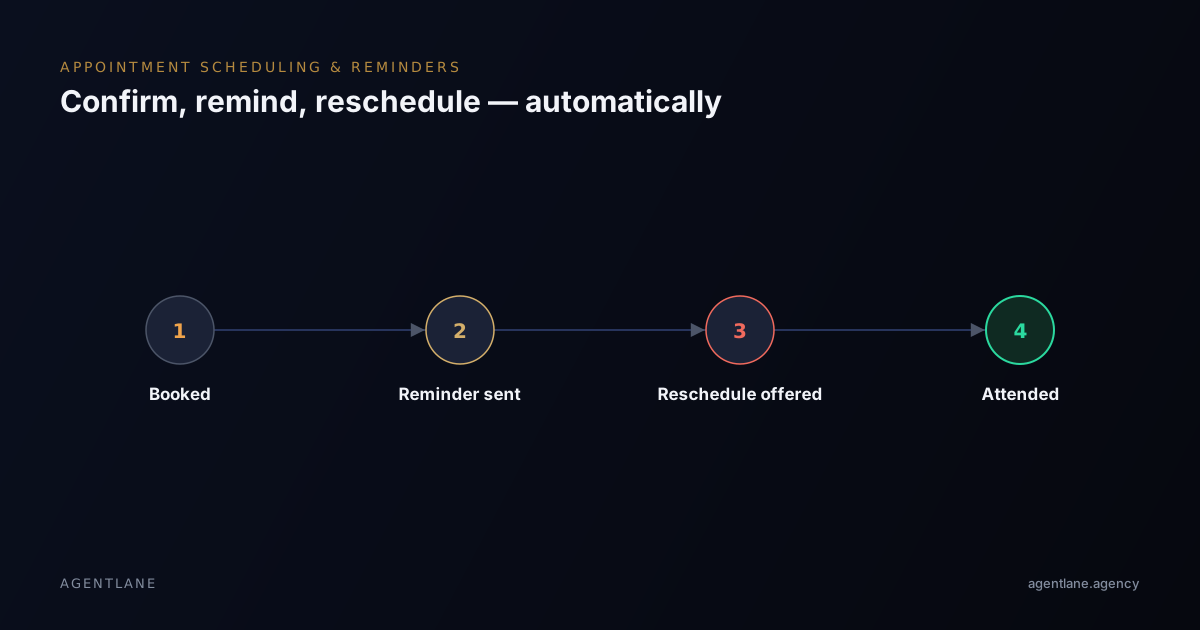
This is the order we actually build a reminder flow in, once a client already has bookings running through Cal.com — not the idealized version, the order where you hit the credential question before the message-copy question, because that's genuinely what happens first.
Step 1: Confirm Cal.com is genuinely the calendar of record
Before touching reminders, check what the client is really booking against. AgentLane's own agents that touch a calendar — Lead Qualifier and Property Enquiry Qualifier — both read and write through Cal.com specifically, not a generic calendar abstraction. If a client's actual booking system is something else and Cal.com is just where the agency happens to be building, that's a mismatch worth catching before step 2, not after the flow is live and nothing matches what the front desk sees.
Step 2: Resolve which Cal.com credential is really being used
This is the step most build logs skip and most support tickets trace back to. A Cal.com credential resolves through a waterfall: the client's own key (set in their own Settings → Credentials) beats the agency-wide default (set in Settings → Integrations), and there's no platform fallback for Cal.com at all — one of those two has to be configured, or nothing books.
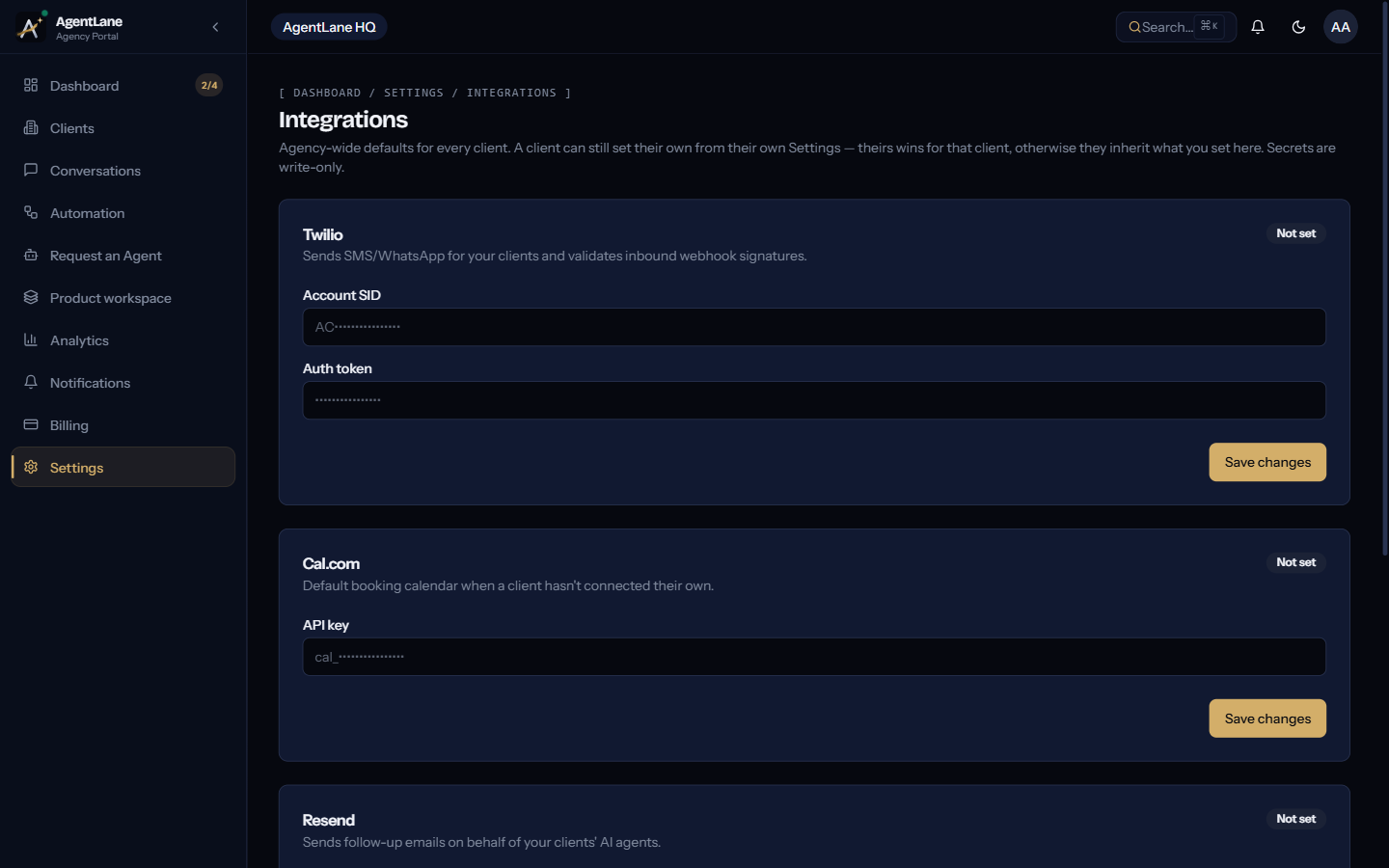
The failure mode this step exists to catch: a client who used to have their own Cal.com key, then removed it, still has an "inherited" row showing your agency default — but if they never removed the key and you assume they're on your default, a reminder flow can silently write bookings to the wrong calendar. Check the actual resolved source before building anything downstream of it. Full mechanics in Connect your integrations.
Step 3: Confirm on booking, don't wait for the reminder job
The moment a slot is booked, send the confirmation immediately — date, time, what to expect — while it's still fresh. This part doesn't depend on Cal.com specifics; it's just the first message in the sequence and it should never be batched with anything else.
Step 4: Set the reminder interval by lead time, not a fixed rule
A 24-hour reminder makes sense for a dental cleaning booked two weeks out. It makes far less sense for a same-day plumbing call-out booked an hour earlier — there's no 24-hour mark to hit. The working default: for bookings made more than 48 hours out, send a reminder the day before and again a few hours before; for same-day bookings, skip the day-before step entirely and send a single confirmation plus a short nudge closer to the slot.
Step 5: Build the reschedule path before you ship, not after the first complaint
If a customer texts back "can't make it," the flow needs to read that reply, pull the next few open Cal.com slots, and rebook — not log a cancellation and stop. This is the step most likely to be missing in a first build, because it's easy to test the happy path (booking → reminder → attendance) and never simulate a reschedule reply during testing. Test it explicitly before calling the flow done.
Step 6: Decide who owns a repeated no-show, and route it there
Most no-shows are "I forgot," and a reminder fixes those. A minority are a pattern from the same customer, and no amount of message tuning fixes that — it needs a person deciding whether to keep offering that customer automated slots at all. Flag repeat no-shows for a human to review rather than silently re-booking the same risk every cycle.
What broke, the times we've seen it
The most common failure isn't the reminder message — it's a reschedule reply that the automation reads correctly but never actually writes back to Cal.com, so the front desk is still looking at the old time. Test the whole loop end to end, including what the calendar shows after a reschedule, not just that the confirmation text sent.
The second most common: skipping the credential-waterfall check in step 2, then debugging a "reminders aren't going out" ticket for an hour before finding the client's own Cal.com key was set and pointing somewhere unexpected.
Where this connects to other flows
A completed appointment is a natural trigger for what comes next — a review request (see review and reputation automation) for a service business, or the next quote for a trades business (see quoting automation for trades). Building the reminder flow with that downstream trigger in mind from the start avoids a rebuild once a client asks "can it also do X after."
Getting started
If Cal.com isn't connected yet at all, start with Connect your integrations — the credential waterfall in step 2 above is explained in full there. Book a free consultation if you want a second pair of eyes on a specific client's setup before you build.
This is closer to my actual build notes than a polished how-to — the credential-waterfall step exists in this list because it's the one I've watched trip up more than one partner's first build.
Frequently asked questions
- How many reminders is too many?
- Two is usually the sweet spot — one a day or two ahead, one a few hours before. More than that reads as spam and increases opt-outs rather than attendance.
- Does this replace our booking calendar?
- No — it sits on top of Cal.com and reads/writes to it, the same way AgentLane's own Lead Qualifier and Property Enquiry Qualifier agents do, rather than replacing the calendar you already use.
- What if someone wants to reschedule from the reminder text?
- A working flow reads the reply, offers the next available slots, and rebooks automatically — the alternative, where a reschedule reply just sits unread until someone checks the inbox, is what causes the no-show in the first place.
- Whose Cal.com account does the reminder flow actually use?
- Whichever one the credential waterfall resolves to for that client: their own Cal.com key if they've set one in their own Settings → Credentials, otherwise your agency-wide default. There's no platform fallback for Cal.com — one of the two has to be configured.