Review & Reputation Management: Why We Shipped a Reply Agent Before a Request Agent
AgentLane's shipped reputation-management agent drafts replies to reviews that already exist, not requests for new ones. Here's the case for that order, the honest counter-case, and how to run both.
By AgentLane Founder · Founder
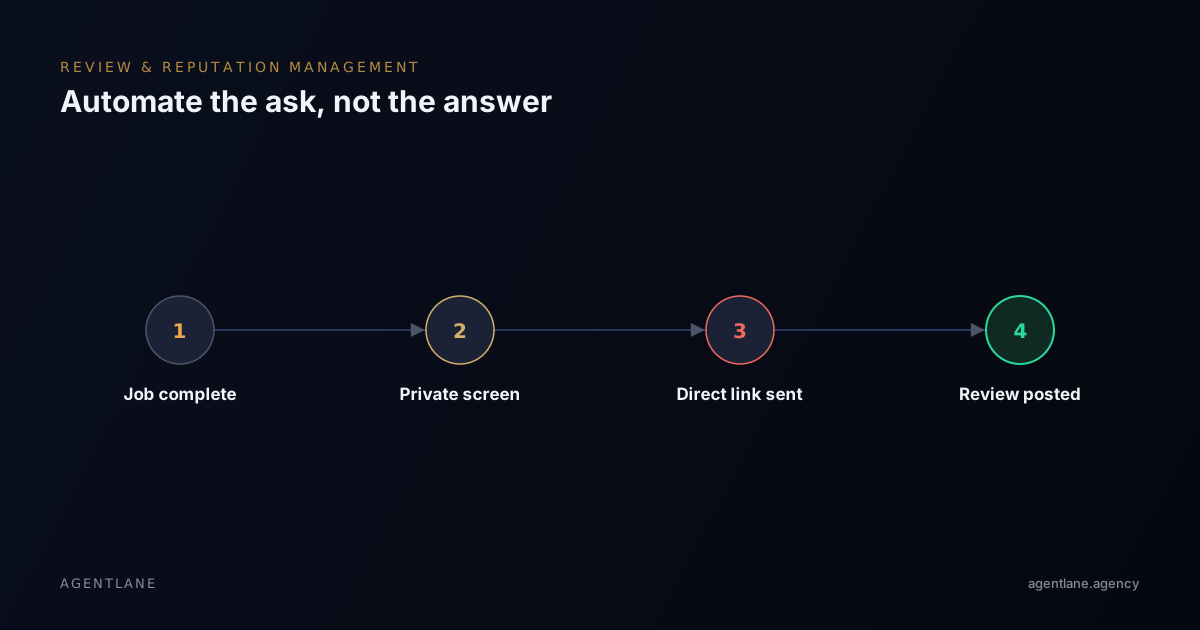
Most "review automation" content — including an earlier version of this post — leads with asking customers for reviews. That's a reasonable thing to automate. It is not, however, what AgentLane's shipped reputation-management agent actually does. ai-google-reviews-responder drafts replies to reviews that already exist. It doesn't send outbound requests. This post makes the case for why that's the right agent to build first, then argues the other side honestly, because the counter-case is real too.
The case for replying first
A review sitting unanswered for weeks is a worse look than a mediocre one that got a thoughtful reply — prospective customers reading a business's Google profile check the replies as much as the stars, and an unanswered 3-star review reads as a business that doesn't care, regardless of what actually happened. Requesting new reviews adds volume to a profile; replying changes how every review already on it reads to the next person deciding whether to book.
Responding is also the more industry-agnostic of the two problems. Any business with a Google Business Profile has this exact need — it doesn't depend on having a booking system, a CRM, or a job-completion trigger the way a request flow does. That's reflected honestly in the shipped agent's own industry-fit list, which is the widest of any of AgentLane's twelve catalog agents: aesthetics, dental, home services, legal, real estate, accounting, insurance, healthcare, construction, solar, recruitment, hotels, automotive, education, restaurants, veterinary, fitness, and retail.
It's also the lightest agent in the catalog, credential-wise:
| Provider | Used for |
|---|---|
anthropic |
Drafts the reply |
postgres |
Logs the review and the drafted reply |
Notably absent: cal_com and resend. This is the only catalog agent that doesn't book anything or send an outbound email — it only drafts a reply. That's a smaller, more contained thing to get wrong than a flow that also touches a calendar and an outbound inbox.
How it decides what to do with a review
Webhook (new review) ──► Draft Reply with Claude ──► Parse Claude Response
                                                              │
                                                              ▼
                                                Determine Approval Status
                                                              │
                                                              ▼
                                                           Switch
                                    /                                          \
                          Auto-approved                                  Needs approval
                                 │                                              │
                     Log Review to Supabase                        Log Review to Supabase
                     Slack: Auto-Approved Reply                    Slack: Needs Approval
A confident, on-brand reply for a routine review gets logged and posted automatically, with a Slack notification either way. A low-confidence or sensitive review — one alleging a serious complaint, say — routes to a human for approval instead of posting unsupervised. Both branches log to Postgres regardless of outcome, so there's a permanent record even for the reviews a human ends up handling personally.
Full reference, including required credentials and the deploy path (identical to any non-instant agent — see Deploy your first agent for the request-dialog walkthrough), is at /docs/agents/google-reviews-responder.
The honest counter-argument
None of the above means requesting reviews is a lesser problem — it's a different one, and for a business that already replies promptly but rarely gets asked in the first place, it's arguably the higher-leverage automation to build. Most local businesses don't have a review problem because the work was bad; they have one because nobody asked, or someone asked three days too late after the customer's attention had moved on. A completed job or appointment is a clean, existing trigger most businesses already have in a scheduling or invoicing system — the technical lift to fire a timed, personalised request off that trigger is genuinely small.
If you're building or buying a request flow rather than a reply agent, the mechanics that hold up in practice:
- Ask everyone, not just customers you predict were happy. Selectively gating the public ask by predicted sentiment risks violating most platforms' terms of service, and it produces a suspiciously perfect rating that reads as fake anyway.
- Screen privately first. A short "how did everything go?" question before the public ask routes unhappy responses to a manager instead of straight to a public complaint.
- Time it to the work. Same-day repairs get asked within a few hours; multi-day projects get asked the next morning after a final walkthrough; recurring service contracts get asked every third or fourth visit, not every single one.
Running both, honestly
The two automations are genuinely complementary rather than substitutes for one another, and a client who has one often assumes they're covered on both — worth spelling out explicitly when scoping either. A request flow drives more reviews onto the profile; a reply agent makes sure every one of them, positive or not, gets a considered response instead of silence. Neither replaces the other, and claiming a request-only or reply-only tool covers "reputation management" end to end oversells what either one actually does.
Getting started
If you want to see the reply agent's real credential requirements and deploy path, start at /docs/agents/google-reviews-responder. If you're evaluating whether a request flow is worth building on top of it for a specific client, book a free consultation and bring their current review volume and job-completion trigger — we'll tell you which one to build first for that business specifically.
This post used to lead with review requests. We rewrote it once it stopped matching what we'd actually shipped — the reply agent came first, and the ordering above reflects that, not a marketing preference.
Frequently asked questions
- Does AgentLane's catalog agent request reviews or reply to them?
- It replies. The Google Reviews Responder (ai-google-reviews-responder) drafts responses to reviews that already exist on your Google Business Profile — it does not send outbound requests asking customers to leave one.
- Won't asking everyone for a review get us more negative ones too?
- Asking everyone, not just customers you predict were happy, is actually the safer approach under most review platforms' terms of service — selectively asking only satisfied customers risks violating them. A short private feedback step before any public ask catches most unhappy customers before they reach Google.
- Does the reply agent post automatically, or does a person approve it first?
- Both, depending on confidence. A routine review gets a drafted reply logged and posted automatically with a Slack notification either way; a low-confidence or sensitive review — one alleging a serious complaint, for instance — routes to a human for approval instead of posting unsupervised.
- Do we need to change our review platform to use this?
- No. The reply agent reads from and posts to whichever Google Business Profile you already have — there's nothing to migrate.