Setting Up Twilio for a Client's Missed-Call Flow: The Fields That Actually Matter
Number porting vs. conditional forwarding, what 10DLC registration actually requires, and the one field on the client detail page that silently breaks the whole flow if it doesn't match Twilio.
By AgentLane Founder · Founder
A missed-call text-back flow lives or dies on three Twilio decisions made before the AI ever gets involved: whether you port the number or forward it, whether the client's US number is registered for A2P 10DLC, and whether the number typed into AgentLane's client record actually matches what Twilio is routing calls through. Get those three right and the AI configuration is the easy part.
This is the field-by-field version of Twilio setup, written for the part of the job that actually eats time — not the AI prompt, the telephony.
Decision one: port the number, or forward it
Porting moves the client's existing business number onto a programmable telephony provider outright. Once ported, that number is fully under programmatic control — you can trigger a webhook on any unanswered call, send SMS from it, and route it however the flow needs. The tradeoff is a short porting window (typically a few business days) during which the number needs careful handling so it's never dead air for real customers.
Conditional forwarding leaves the client's number exactly where it is and adds a forward-on-no-answer or forward-on-busy rule pointing at a new tracking number that Twilio actually receives. This is faster to stand up — no porting delay — but it adds a hop: the caller dials the original number, it rings out, then forwards, and only then does the automation trigger. That extra step is usually a second or two, which matters less for text-back (the SMS still goes out fast once the forward lands) and matters more if you're layering in a voice agent that's supposed to pick up before the caller notices anything happened.
There's no universally correct choice. Porting is the cleaner long-term setup for a client committing to the automation as their primary line. Forwarding is the right call for a pilot — it's reversible in minutes if the client wants to back out, with zero risk to their existing number.
Decision two: 10DLC registration, if the client is on a US number
If the client's number is a US long code sending automated texts, A2P 10DLC registration is a real compliance requirement, not an optional best practice — carriers block unregistered application-to-person traffic on US long codes. This is a Twilio-account-level step tied to the client's actual business (their EIN or equivalent, a brand registration, and a campaign use-case registration), not something AgentLane's dashboard has any control over or visibility into.
The practical implication for onboarding: budget for this as a separate task with its own timeline, done on the client's Twilio account. It usually takes one to three weeks, and texting from the number starts only once it clears, pilot included. Start it the day you take the client on, in parallel with the agent setup, not after go-live.
The field that quietly breaks everything if it's wrong
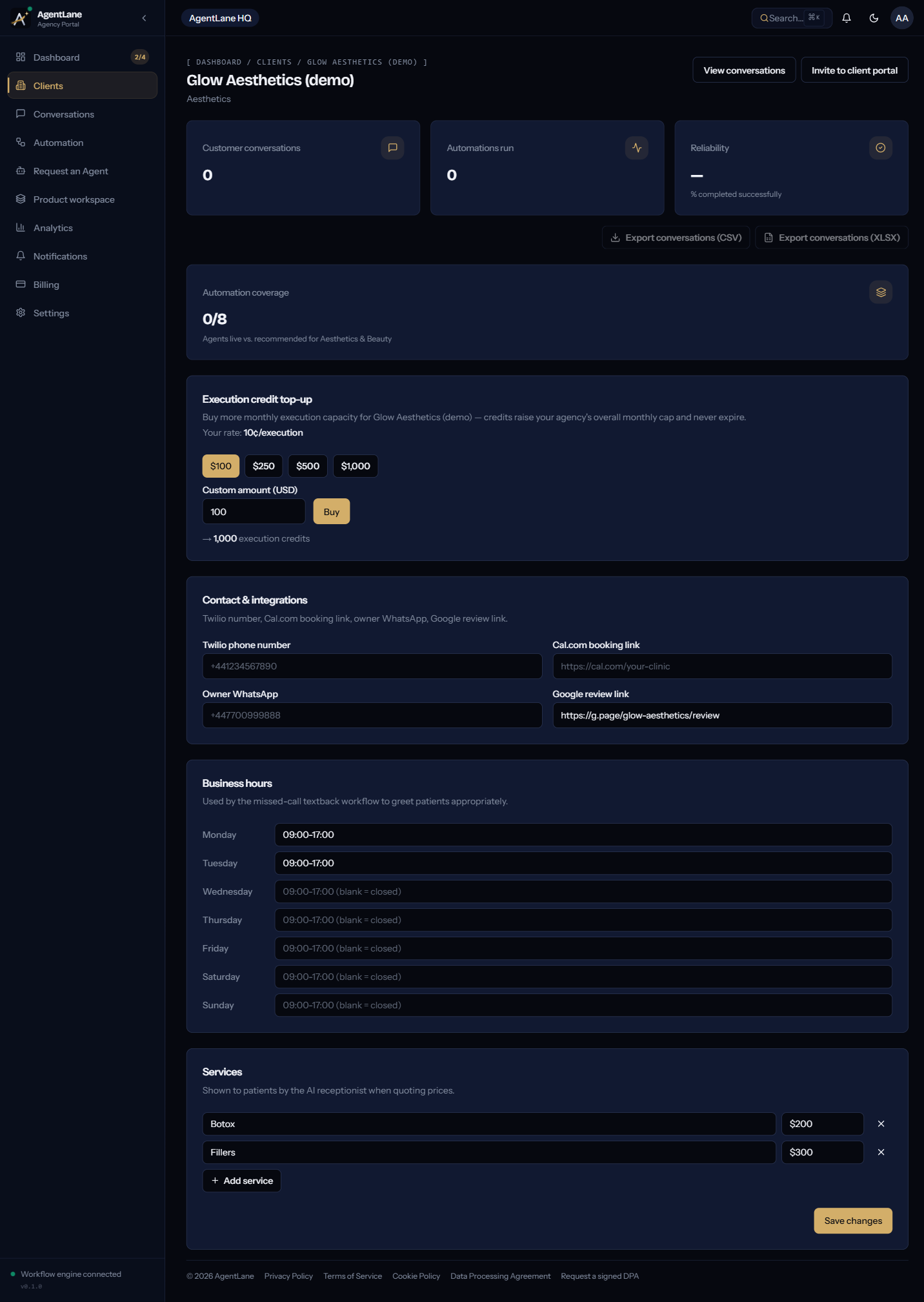
AgentLane's client detail page has exactly one field for this: Twilio phone number, under Contact & integrations, formatted like the placeholder shown in the form — +441234567890.
This field does not configure anything on Twilio's side — it's a record AgentLane holds so the dashboard, the client portal, and your own team all agree on which number belongs to which client. The actual routing — pointing the Twilio number's webhook at AgentLane's endpoint — happens in the Twilio console, separately.
That separation is exactly where things go wrong. If the number typed into this field doesn't match the number actually configured in Twilio's console (a typo, a leftover test number, a number that got ported after the field was filled in), the symptom is specific and easy to misdiagnose: the workflow instance shows Active, the agent looks fully deployed, and no executions ever appear — not failed ones, none at all — because nothing is reaching AgentLane's webhook in the first place. That's the exact failure mode the official walkthrough calls out under "The agent shows Active, but no executions ever show up" in Deploy your first agent: double-check the Twilio phone number field against what's actually configured in the Twilio console.
The fix takes thirty seconds once you know to look — open the client page, compare the field against the Twilio console, correct whichever one is wrong. The expensive part is not knowing to check it, because a live-looking dashboard gives you no reason to suspect the number.
Where Twilio sits in the credential waterfall
Twilio credentials — Account SID and Auth Token — are set at Settings → Integrations as an agency-wide default, or overridden per client from their own Settings → Credentials. Unlike anthropic, Twilio has no platform fallback: AgentLane never silently uses its own Twilio account on a client's behalf. If neither the client nor your agency has a Twilio credential configured, that branch of the flow simply cannot run — see API Access → BYOK Credentials Vault for the exact provider list and what happens without one.
For most agencies, one shared agency-level Twilio account covers a pilot client fine. A client who wants a dedicated number, their own billing relationship with Twilio, or control over their own compliance registration needs their own account credentialed at the client level — which then wins over your agency default automatically, no extra configuration required beyond setting it once.
A short setup checklist
- Decide port vs. forward before you touch anything else — this determines your timeline, not your budget.
- If it's a US number, start A2P 10DLC registration in parallel with setup: texting starts only once it clears, usually one to three weeks later.
- Set the Twilio credential — client-level if they have their own account, agency-level default otherwise.
- Fill in the Twilio phone number field on the client detail page, exactly matching the Twilio console.
- Send a real test call or text and confirm it lands in the Executions feed before telling the client it's live.
If you're setting this up for the first time end to end, Deploy your first agent walks the whole sequence including this step. If Twilio isn't the piece you're stuck on and it's more the "what does this automation actually recover" question, the missed-call text-back math is the companion post with the worked numbers.
I've written the failure mode above — Active workflow, zero executions — the exact way it shows up in practice, because it's the one that costs agencies the most debugging time relative to how simple the fix actually is.
Frequently asked questions
- Do I have to port the client's number, or can I just forward it?
- Either works. Porting moves the number itself onto a programmable telephony provider, which gives full control over call and SMS behaviour. Conditional forwarding leaves the number where it is and forwards unanswered calls to a tracking number instead — faster to set up, but adds a forwarding hop and a second number to keep straight.
- Is 10DLC registration something AgentLane handles for us?
- No. A2P 10DLC registration is a Twilio-side compliance step tied to the client's own Twilio account and the business sending the messages, not something AgentLane's dashboard configures. US carriers block texts from unregistered long-code numbers, so the agent's first text waits until it clears. It usually takes one to three weeks, so start it in parallel with the agent setup.
- What happens if the Twilio phone number field on the client page doesn't match the real number?
- The workflow instance can show Active with zero executions ever appearing, because nothing is actually reaching AgentLane's webhook. This is the single most common cause of 'the agent is live but nothing happens,' and it's a five-second check against the Twilio console.
- Does the client need their own Twilio account, or can we use our agency's?
- Twilio has no platform fallback in AgentLane's credential waterfall — it must be BYOK, set either at the client level or as your agency-wide default. A shared agency Twilio account works for a pilot; a client who wants their own dedicated number and billing eventually needs their own account.